UP Scholarship Status 2025-26: Apply, Renewal & Check status PFMS
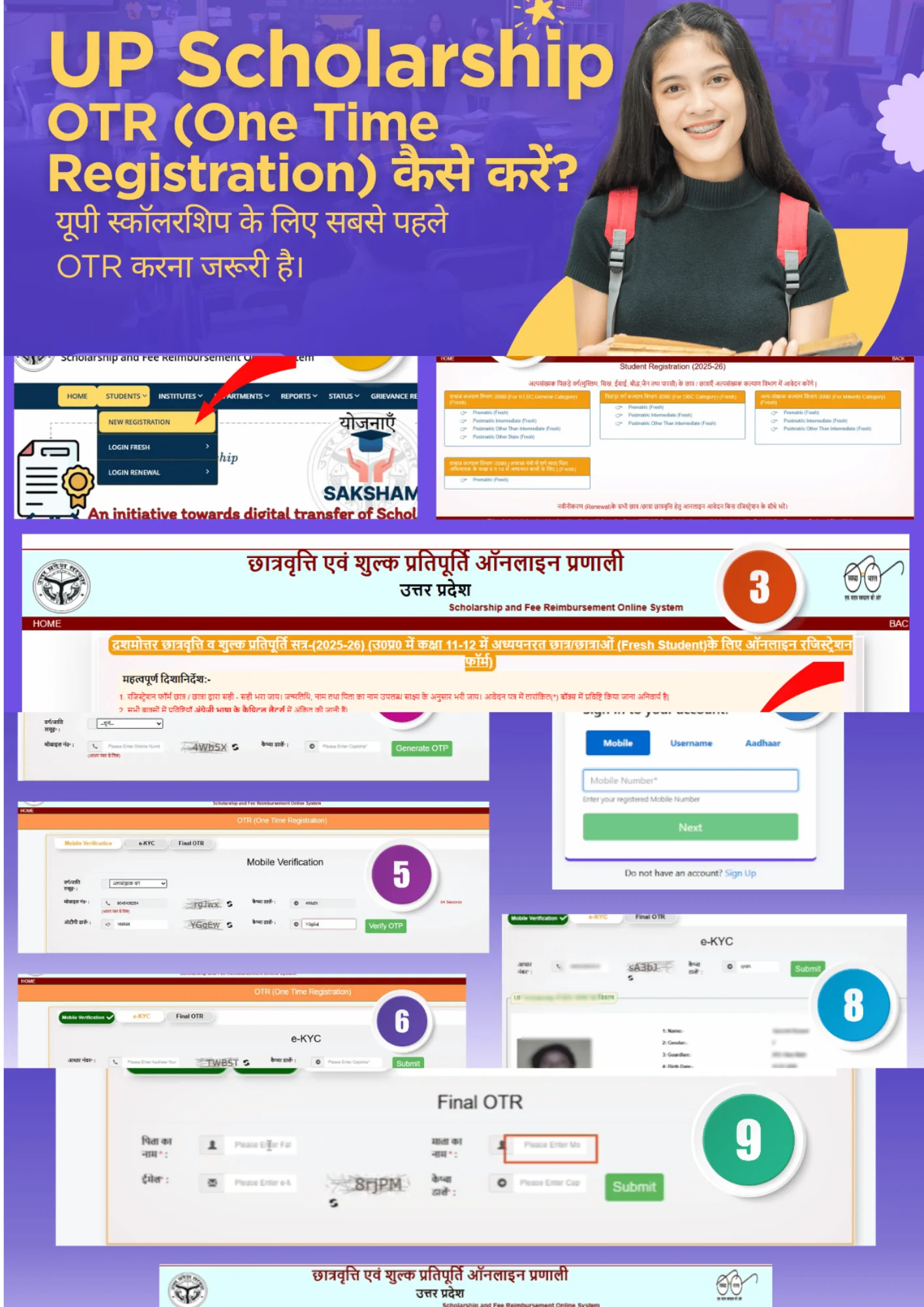
उत्तर प्रदेश स्कॉलरशिप की A-Z जानकारी - Registration से Payment तक
UP Scholarship 2025-26 के लिए complete guidance चाहिए? यहाँ मिलेगी step-by-step registration process, status check methods, required documents list, payment tracking और common problems के solutions। हमने 10+ years के experience से यह detailed guide तैयार की है।
🚨 Latest Updates & Important Notices
Registration Extended
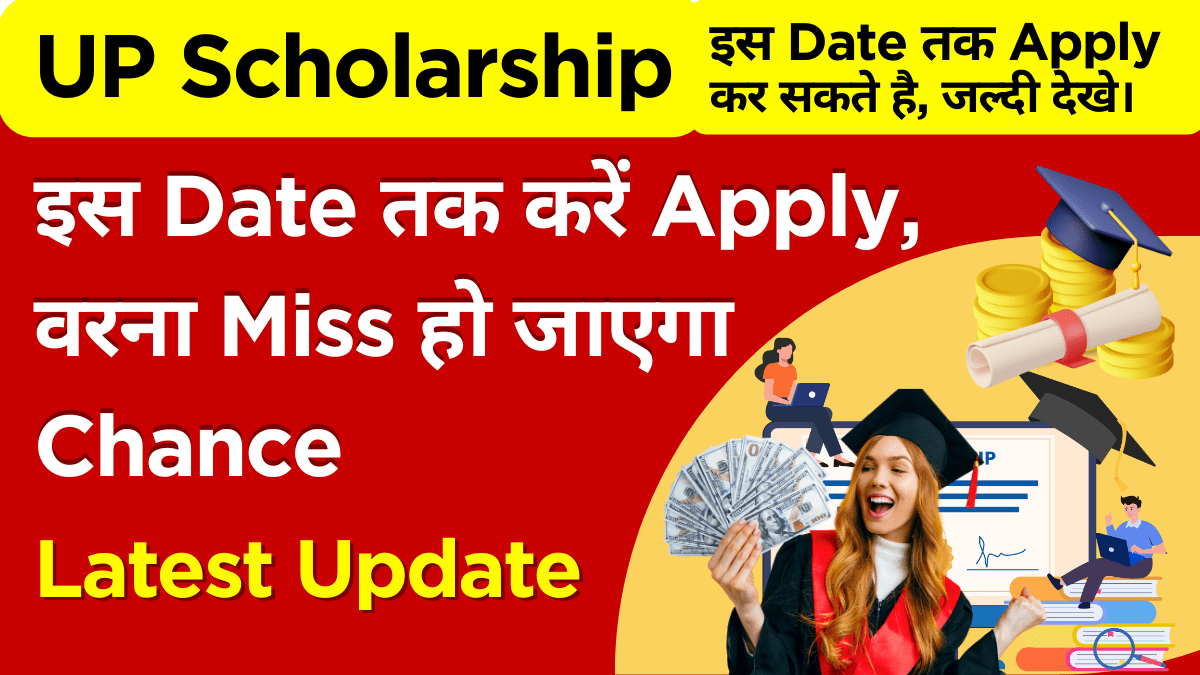
Last Date: 15 दिसंबर 2025 तक बढ़ाई गई
Updated: 23 Aug 2025Portal Maintenance
हर रविवार रात 12-2 AM maintenance होता है
Weekly SchedulePayment Released
Pre-Matric students के लिए 1st installment जारी
15 Aug 2025📖 UP Scholarship 2025-26: Complete Step-by-Step Guide
Registration से payment तक की पूरी प्रक्रिया, images के साथ detailed explanation
Fresh Registration Process (नए Students के लिए)
📋 Prerequisites (पहले से तैयार रखें):
- ✅ Student का Aadhaar Card
- ✅ Bank Account Passbook (Student के नाम से)
- ✅ Previous year की Marksheet
- ✅ Income Certificate (6 months से fresh)
- ✅ Active Mobile Number
- ✅ Email ID
UP Scholarship Portal Access करें
कैसे करें:
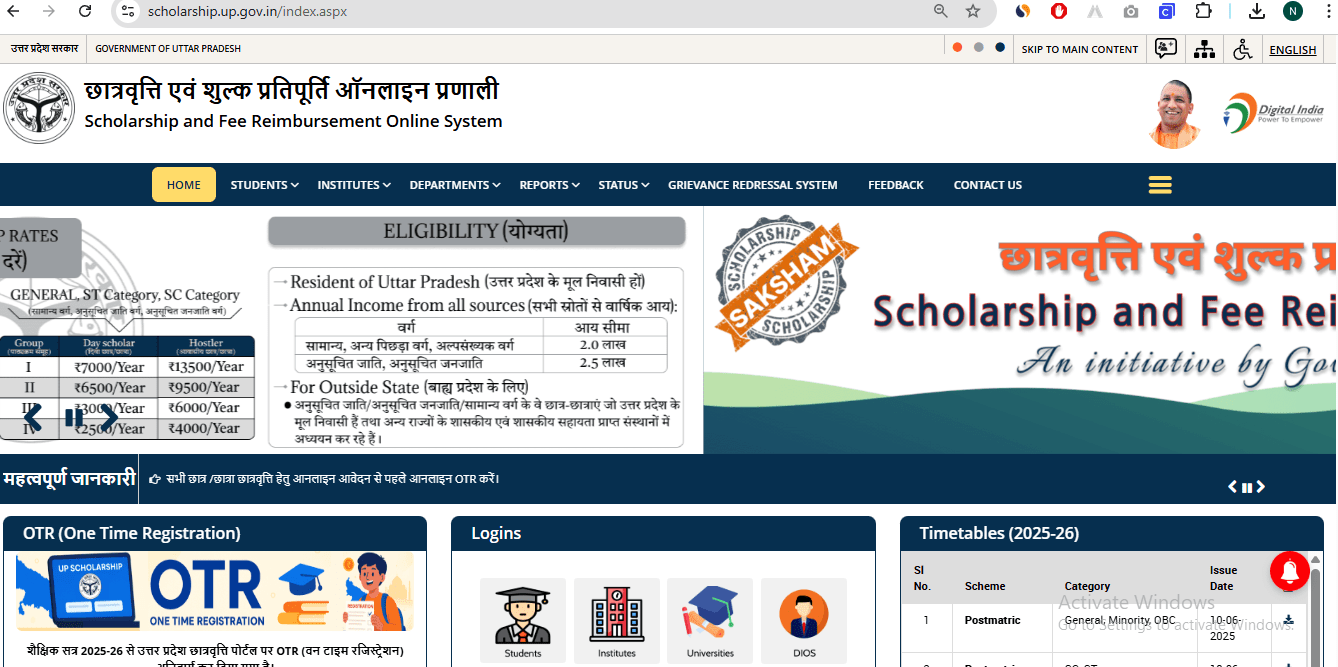
- Browser में scholarship.up.gov.in type करें
- Page load होने का wait करें (slow internet पर time लग सकता है)
- Homepage पर "Student" section देखें
- यदि page load नहीं हो रहा तो different browser try करें
- Best time: सुबह 9-11 AM या रात 10-12 PM
- Chrome या Firefox browser use करें
- Popup blocker disable कर दें
🔗 Related Posts


Student Registration Click करें
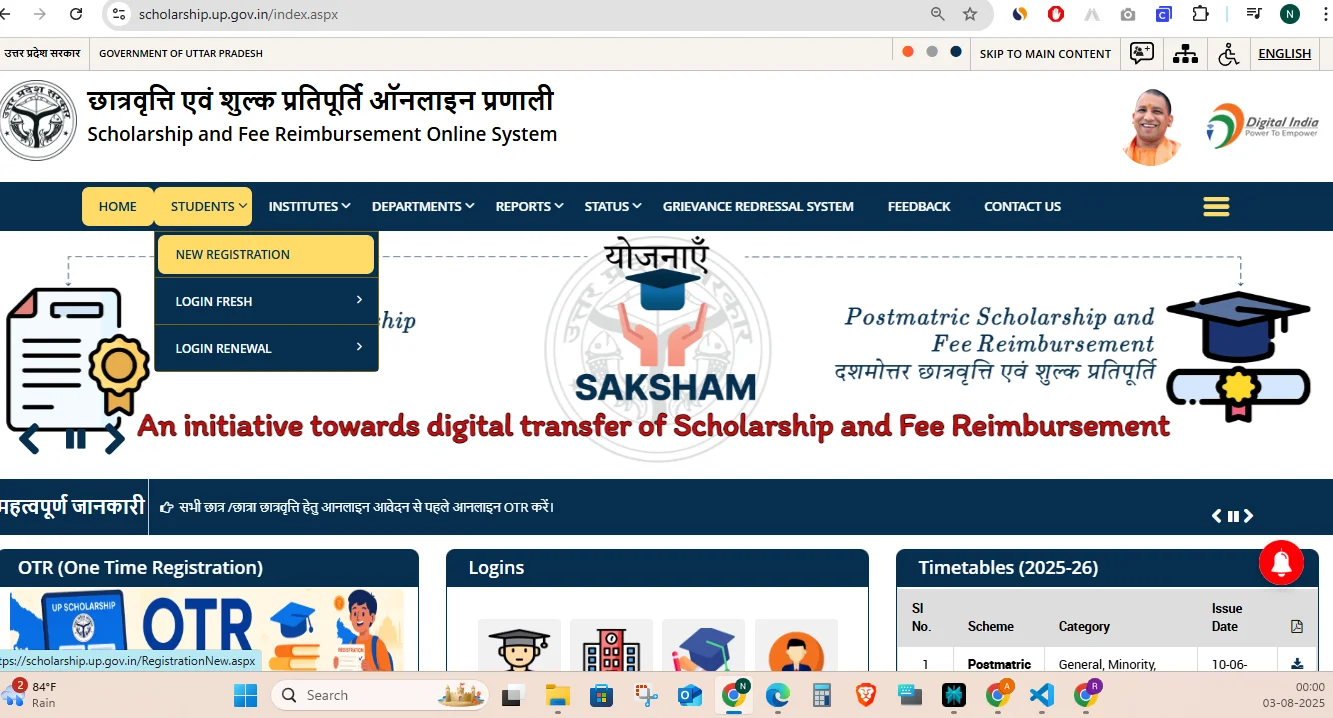
Exact Process:
- Homepage पर "Student" tab में जाएं
- "Registration" link को carefully click करें
- New page खुलने का wait करें
- यदि error आए तो refresh करके retry करें
- Server Busy: 5-10 minutes wait करके retry
- Page Not Found: URL check करें
- Blank Page: Cache clear करें
Category और Class Selection
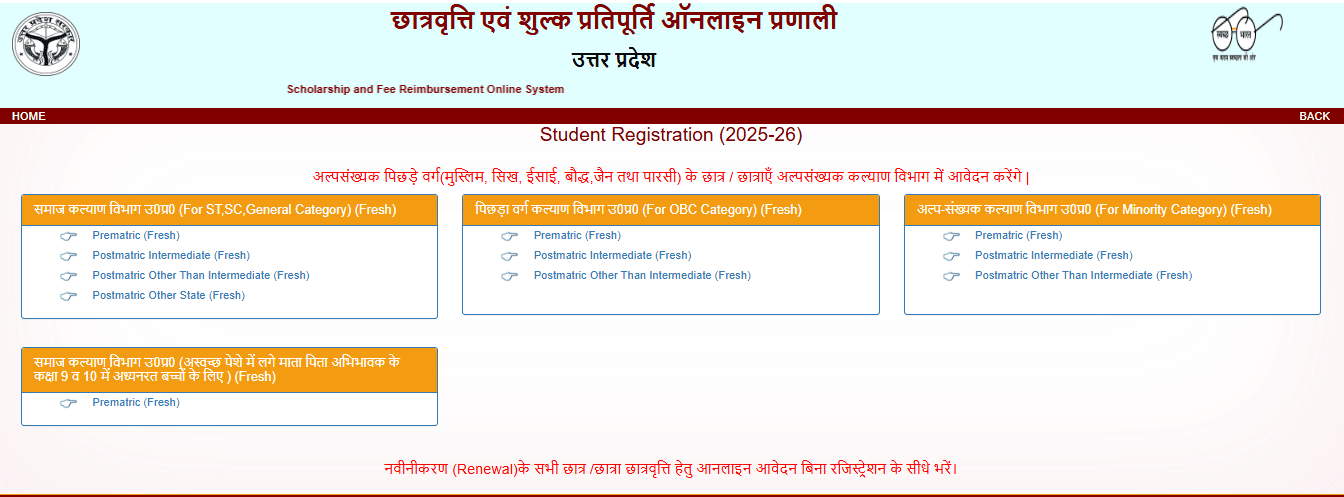
सही Selection कैसे करें:
- Study Level Select करें:
- कक्षा 9-10: Pre-Matric
- कक्षा 11-12: Intermediate
- Graduation/Post-Graduation: Post-Matric
- Category Select करें:
- SC/ST/OBC: अपनी जाति certificate के अनुसार
- General: यदि कोई reservation नहीं
- Minority: Muslim/Christian/Sikh/Buddhist
- Fresh या Renewal: नए students के लिए "Fresh" select करें
| Current Class | Select Option |
|---|---|
| Class 9 | Pre-Matric Fresh |
| Class 10 | Pre-Matric Renewal (if applied before) |
| Class 11 | Intermediate Fresh |
| Class 12 | Intermediate Renewal |
| 1st Year College | Post-Matric Fresh |
Basic Information Entry
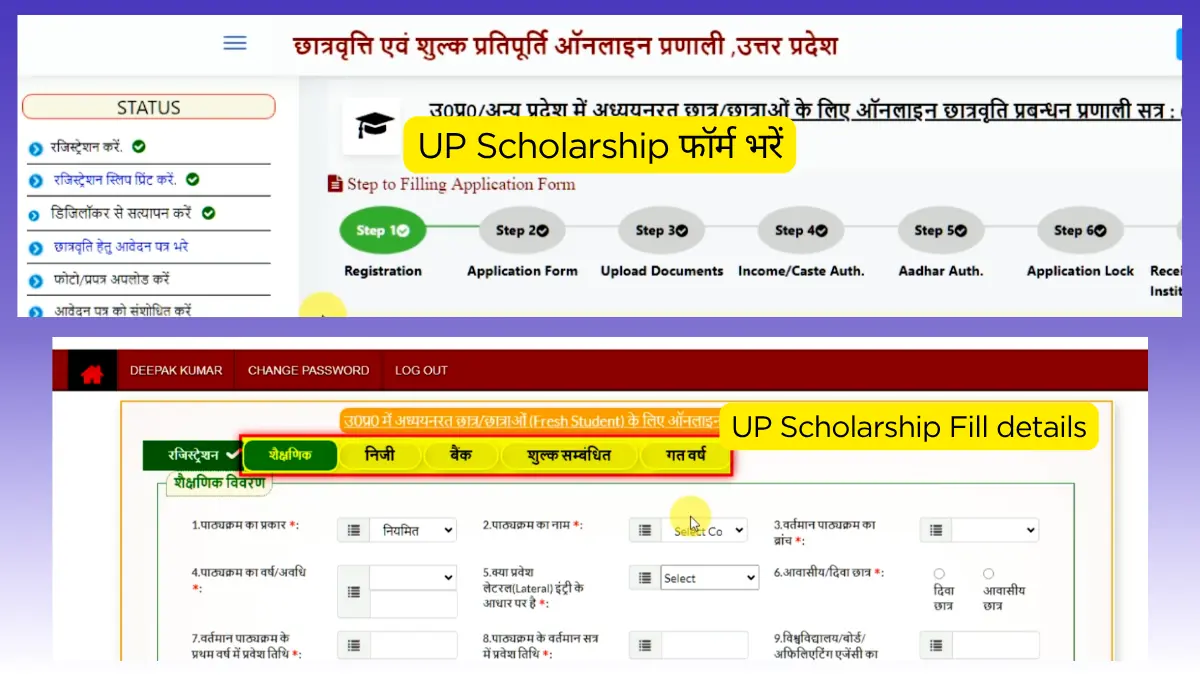
सभी Fields को Carefully भरें:
👤 Personal Information:
- Student Name: Aadhaar Card के exactly same spelling
- Father's Name: Official documents के अनुसार
- Mother's Name: Complete name लिखें
- Date of Birth: DD/MM/YYYY format में
📞 Contact Information:
- Mobile Number: Student का own number (Parent का नहीं)
- Email ID: Active email address
- Aadhaar Number: 12 digit number without spaces
- सभी fields mandatory हैं - कोई भी खाली न छोड़ें
- Mobile number पर OTP आएगा - active number ही use करें
- Email पर updates आएंगी - daily check करने वाला email दें
- Spelling mistakes से बचें - carefully type करें
OTP Verification और Registration Number
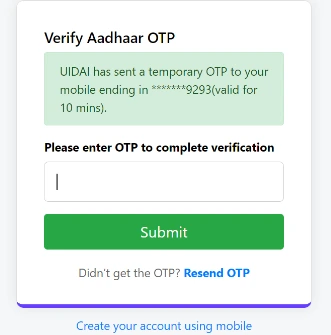
OTP Verification Process:
- Submit button click करने के बाद mobile पर OTP आएगा
- 5-10 minutes तक wait करें यदि OTP नहीं आया
- OTP carefully enter करें - 6 digit code होता है
- Verify button click करें
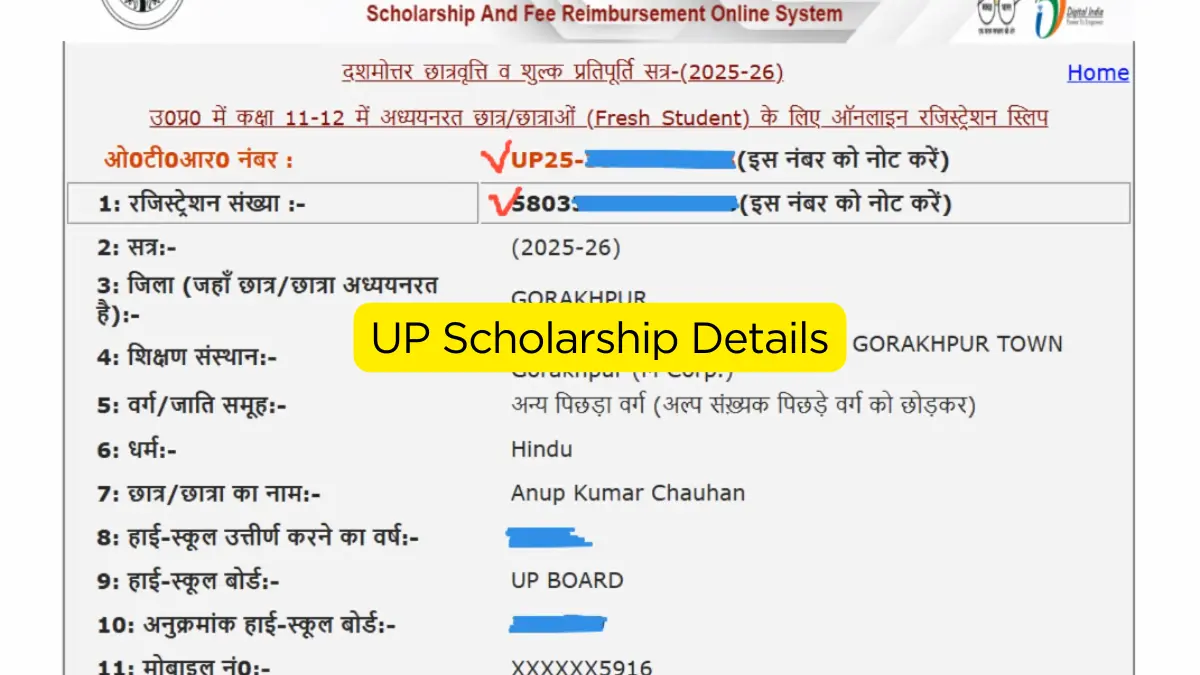
- Success message के बाद Registration Number मिलेगा
System आपको unique registration number generate करके देगा। यह number बहुत important है:
- इसे कहीं safe जगह note कर लें
- Mobile पर SMS भी आएगा
- Email पर भी confirmation भेजा जाएगा
- आगे की सारी process में इसकी जरूरत होगी
- Network signal check करें
- Message inbox और spam folder देखें
- Different network (WiFi/Mobile data) try करें
- 15 minutes बाद "Resend OTP" click करें
Login करके Complete Form भरें
Login Process:
- Portal के homepage पर जाकर "Student Login" click करें
- Registration Number और system generated password enter करें
- Captcha code carefully type करें
- Login button click करें
- Dashboard open होने पर "Fill Application" click करें
📋 Complete Form में ये Sections हैं:
1️⃣ Personal Details Section:
- Complete Address (Permanent + Correspondence)
- Religion, Caste Category details
- Family information (Father/Mother occupation)
- Physical measurements (Height, Weight - if required)
2️⃣ Academic Details Section:
- School/College name और address
- Course details, Subject combination
- Previous year marks, percentage
- Current year admission details
- Day Scholar या Hosteller selection
3️⃣ Bank Details Section:
- Bank name, Branch name
- Account Number (student के नाम से)
- IFSC Code (सही code check करें)
- Account type (Savings/Current)
4️⃣ Family Income Details:
- Father का occupation और monthly income
- Mother का occupation और income (if working)
- Total annual family income
- Income sources की details
Documents Upload करें
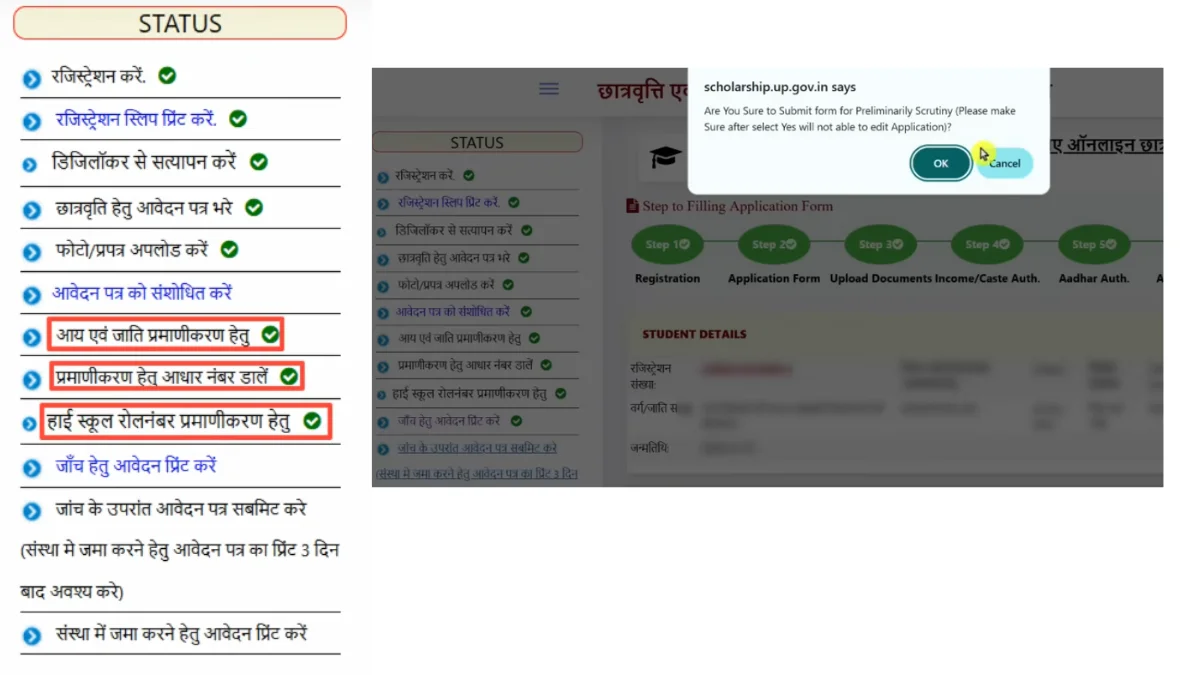
📄 Required Documents Checklist:
🔴 Mandatory Documents (सभी के लिए जरूरी):
Format: PDF या webp | Size: Max 200KB
Requirements: Clear, readable, student के नाम से
Authority: Tehsildar/SDM issued | Validity: 6 months
Format: PDF only | Size: Max 300KB
Account: Student के नाम से ही | Details: Account No, IFSC clear
Format: PDF/webp | Size: Max 200KB
Marks: Min 50% (45% for SC/ST) | Document: Official marksheet
Format: PDF preferred | Size: Max 300KB
Session: 2025-26 admission | Content: Fee receipt/ID card
Format: PDF/webp | Size: Max 200KB
🟡 Conditional Documents (यदि applicable हो):
For: SC/ST/OBC categories only
Format: PDF | Size: Max 200KB
For: Disabled students (40%+ disability)
Format: PDF | Authority: Medical board
📸 Document Upload Guidelines:
📷 Photo Quality:
- Clear, readable text
- Good lighting conditions
- No blur या shadows
- All corners visible
💾 File Requirements:
- PDF format preferred
- webp भी acceptable
- Size limit follow करें
- Single page per file
✅ Upload Tips:
- One by one upload करें
- Upload होने का wait करें
- Green tick confirm करें
- Error आने पर retry
Final Submission और Print
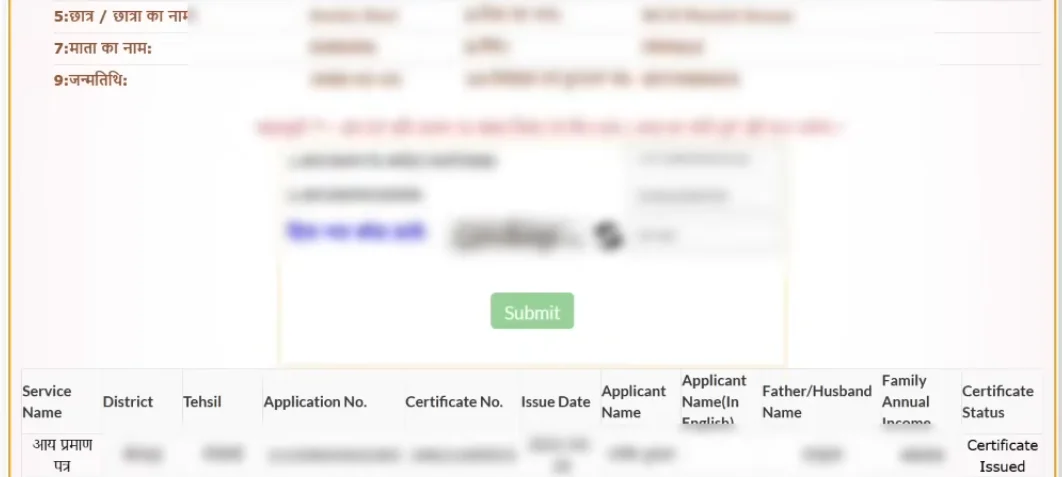
Final Steps को Carefully Complete करें:
1️⃣ Preview और Verification:
- "Preview" button click करें
- सभी information को carefully review करें
- कोई mistake दिखे तो "Edit" करें
- Documents properly upload हुए हैं confirm करें
- Bank details, mobile number double-check करें
2️⃣ Declaration और Agreement:
- Terms and Conditions carefully पढ़ें
- "I agree" checkbox को tick करें
- Declaration statement को accept करें
- यह confirm करें कि सभी information सही है
3️⃣ Final Submission:
- "Final Submit" button click करें
- Confirmation popup में "Yes" click करें
- Success message आने का wait करें
- Application Number note कर लें
4️⃣ Print और Institution Submission:
- "Print Application" click करें
- PDF download होने का wait करें
- Print निकाल कर self-sign करें
- School/College में जमा करें (deadline से पहले)
- Receipt लेना न भूलें
✅ Submission के बाद Important Points:
SMS/Email Confirmation: Registration success का message आएगा
Application Number: Safe place पर save करें
Hard Copy: 2-3 copies print करके रखें
Institution Submission: 7 days के अंदर जमा करें
Status Check करने की Complete Process
Method 1: UP Scholarship Portal से Status Check
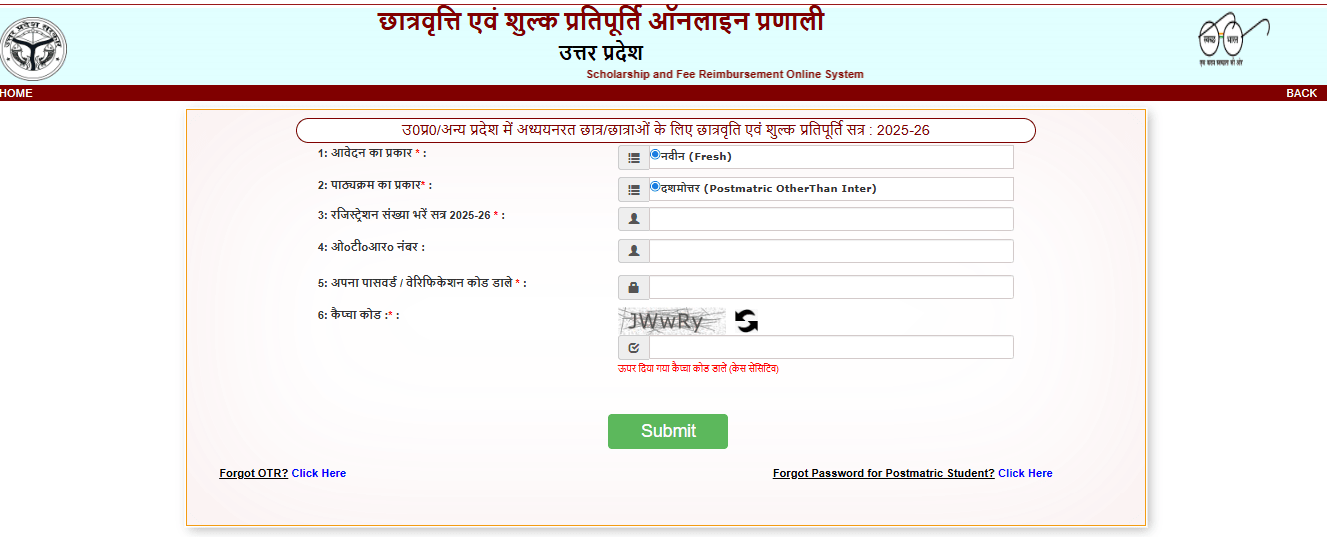
Portal Login करें
- scholarship.up.gov.in पर जाएं
- "Student Login" section में click करें
- Registration Number और Password enter करें
- Captcha code fill करें
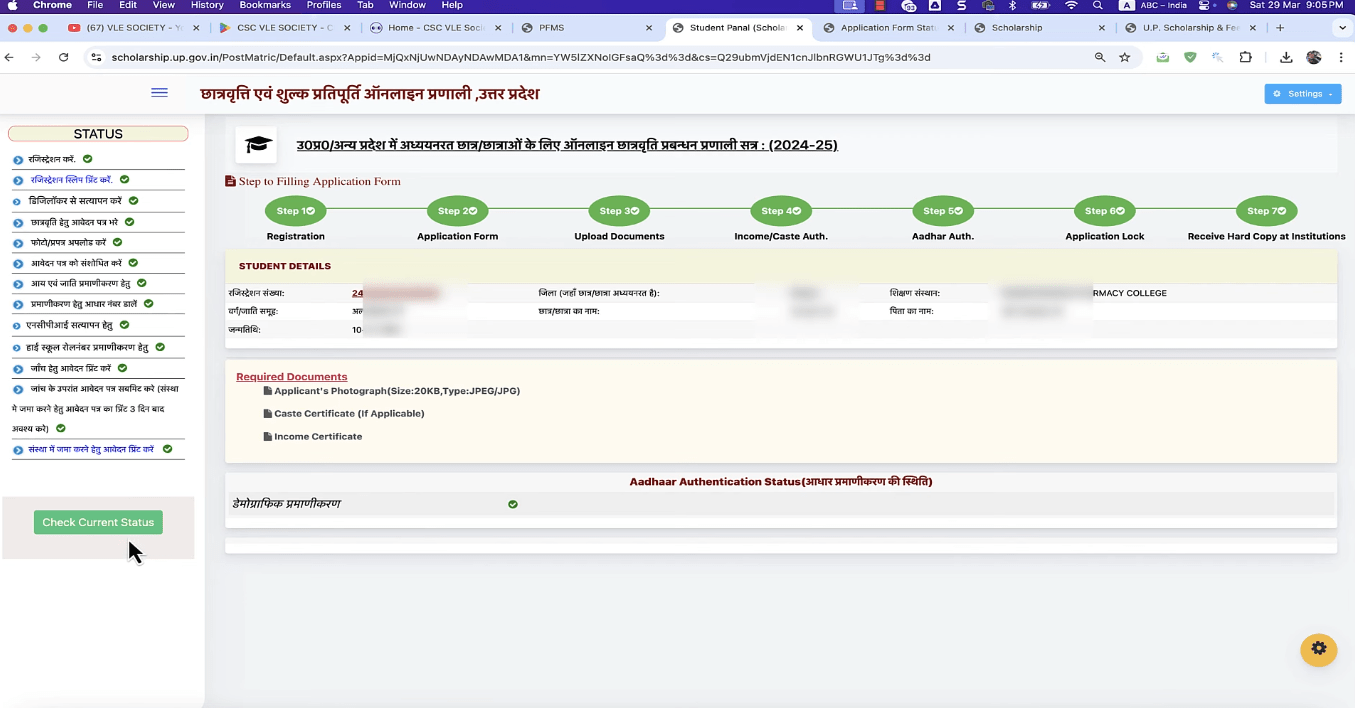
Dashboard Check करें
- Login होने के बाद dashboard open होगा
- "Application Status" section देखें
- Current stage और progress check करें
- यदि कोई action required हो तो complete करें
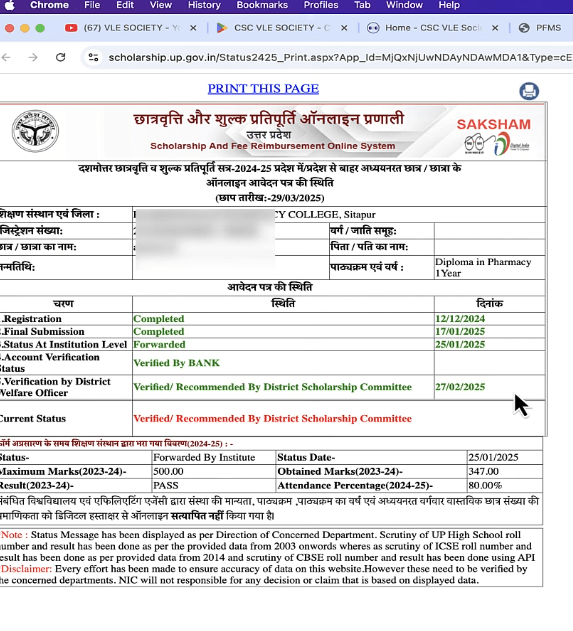
Detailed Status देखें
- "View Details" या "Track Application" click करें
- Step-by-step progress देखें
- Institute verification status check करें
- Department approval status confirm करें
📋 Status Meanings की जानकारी:
आपका application successfully submit हो गया है
Institute या department में documents check हो रहे हैं
Application approve हो गई, payment process में है
Scholarship amount bank account में transfer हो गई
Method 2: PFMS Portal से Payment Status Check
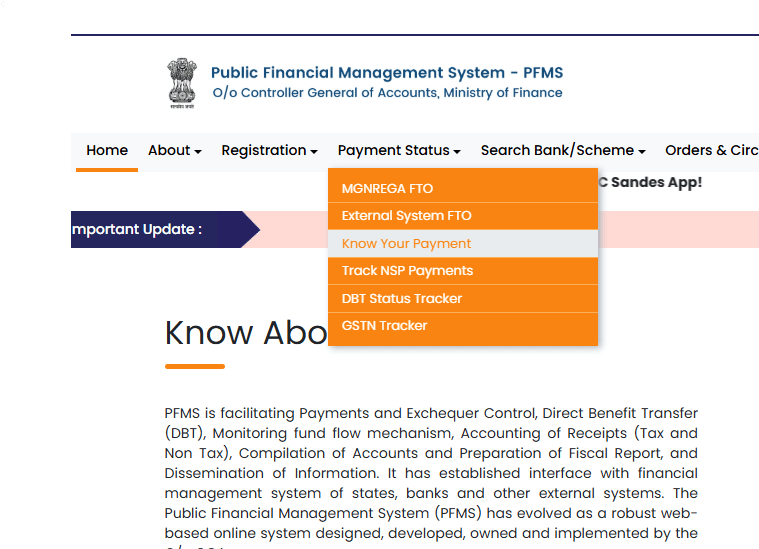
PFMS Portal Access
- Browser में pfms.nic.in open करें
- Homepage पर "Know Your Payment" देखें
- यह section citizen services में मिलेगा
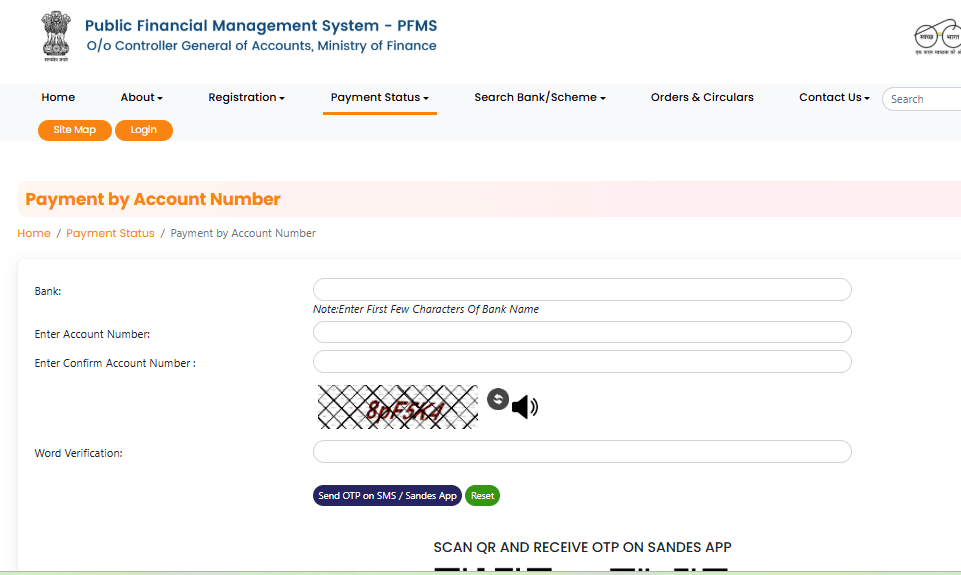
Search Method Select करें
- By Bank Account: Account number से search
- By Aadhaar: Aadhaar number से search
- By Mobile: Registered mobile number से
- सबसे accurate: Bank Account method
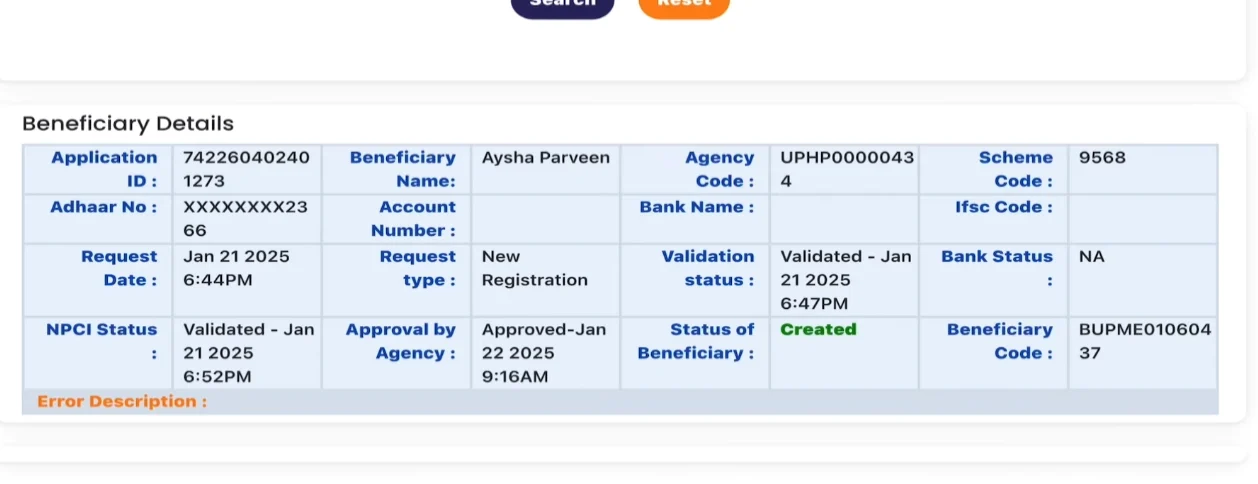
Payment History देखें
- Search results में scholarship payments show होंगी
- Payment date, amount, transaction ID मिलेगी
- "PFMS MOSP" के नाम से credit दिखेगा
- PDF download कर सकते हैं proof के लिए
Method 3: UMANG Mobile App से Status Check
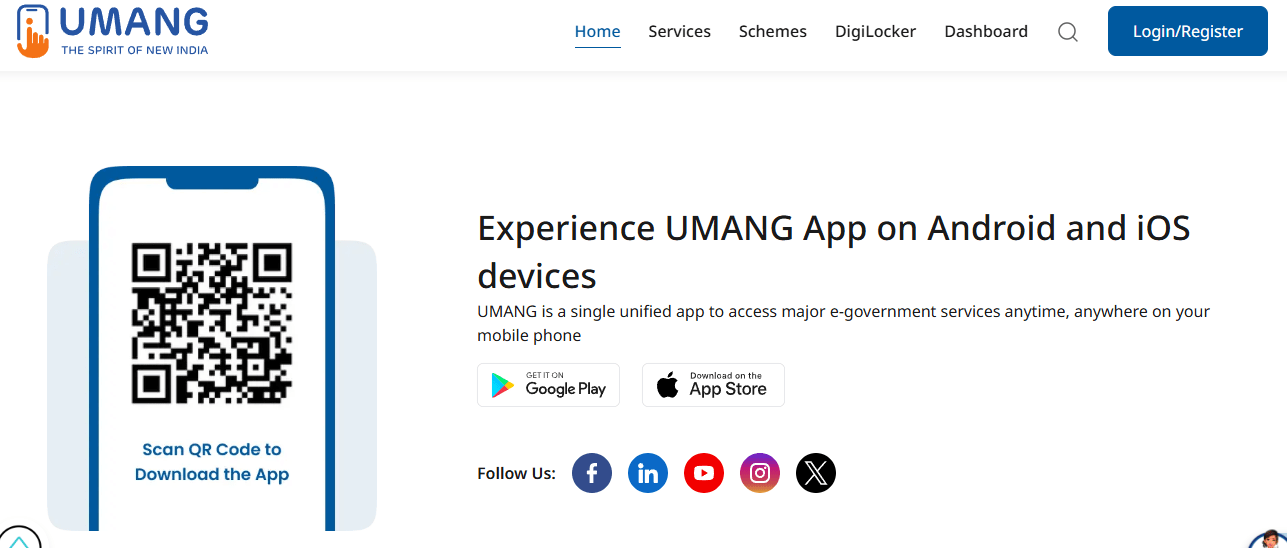
UMANG App Download करें
- Google Play Store या App Store से download करें
- "UMANG" search करके official app install करें
- Mobile number से registration करें
- OTP verification complete करें
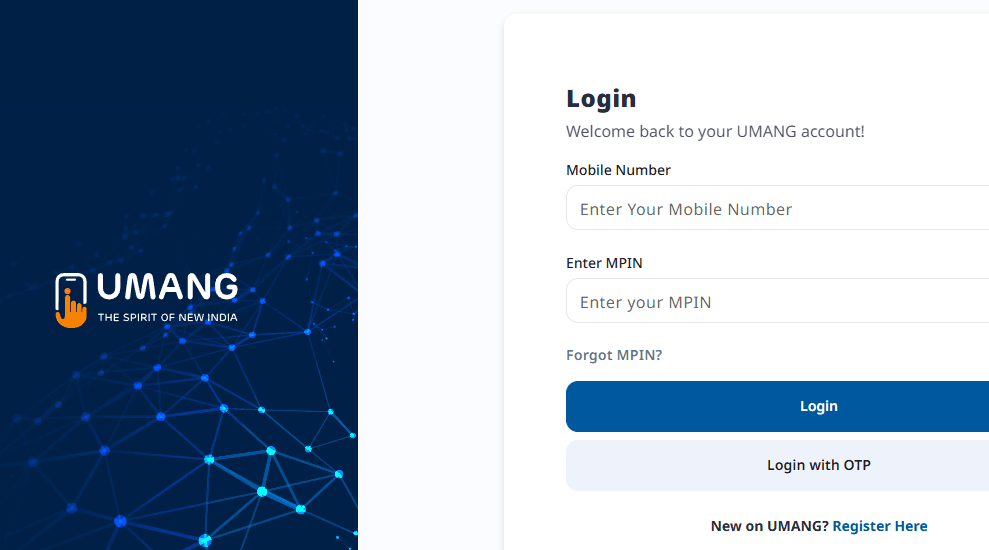
Scholarship Service Find करें
- App में "Services" section में जाएं
- "Education" category select करें
- "Scholarship" service को choose करें
- "Uttar Pradesh" state select करें
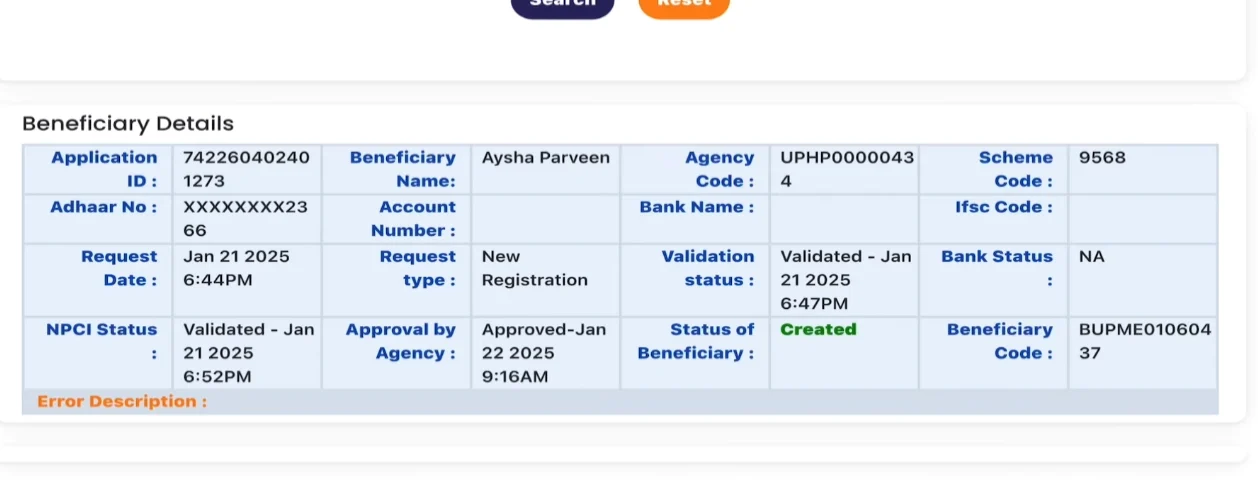
Status Check करें
- Registration number या application ID enter करें
- DOB या other verification details add करें
- "Check Status" button tap करें
- Status information display होगी
🔧 Common Problems & Expert Solutions
Students के सबसे common issues और उनके step-by-step solutions
Login Issues
- Password भूल गए
- Invalid credentials error
- Account locked message
- Captcha code error
- Password Reset:
- Login page पर "Forgot Password" click करें
- Registration number enter करें
- Mobile पर OTP आएगा
- New password set करें
- Account Unlock:
- 24 hours wait करें automatic unlock के लिए
- या helpline number पर call करें
- Browser Issues:
- Cache और cookies clear करें
- Different browser try करें
- Incognito mode use करें
Payment Not Received
- Bank account details गलत
- Account seeding pending
- Verification incomplete
- Document issues
- Check PFMS Status:
- PFMS portal पर payment status check करें
- Account seeding status verify करें
- Verify Bank Details:
- Account number, IFSC code check करें
- Account student के नाम से है confirm करें
- Contact Points:
- Institute के scholarship nodal officer से मिलें
- District scholarship officer को contact करें
- Helpline number पर complaint करें
Document Upload Issues
- File size too large
- Invalid format error
- Upload failed message
- Document rejected
- File Optimization:
- File size 200KB से कम करें
- PDF या webp format use करें
- Image को compress करें
- Quality Check:
- Document clearly readable हो
- All text visible हो
- No blur या shadows
- Upload Tips:
- Good internet connection use करें
- Peak hours avoid करें
- One document at a time upload करें
Mobile/Contact Issues
- Mobile number change करना
- OTP नहीं आ रहा
- Email not receiving
- Address update required
- Mobile Number Change:
- Institute के office में written application दें
- New mobile number Aadhaar से linked हो
- ID proof attach करें
- OTP Issues:
- Network signal check करें
- Spam folder में देखें
- Different network try करें
- Contact Update:
- Correction period में portal पर update करें
- या institute through application दें
❓ Complete FAQ Section: सभी सवालों के जवाब
Students के 100+ common questions और detailed answers
Eligibility Requirements:
- Domicile: उत्तर प्रदेश का मूल निवासी होना जरूरी
- Class Range: कक्षा 9 से Post-Graduation तक के students
- Age Limit: कोई specific age limit नहीं है
- Course Type: केवल regular courses (distance learning excluded)
Income Limits by Category:
| Category | Annual Income Limit |
|---|---|
| General/OBC | ₹2,00,000 |
| SC/ST | ₹2,50,000 |
| Minority | ₹2,00,000 |
| Disabled | ₹2,50,000 |
Complete Timeline:
Total Expected Time: 3-4 months (in normal cases)
Factors affecting timeline:
- Document verification delays
- Bank account issues
- Peak application periods
- Government budget approval cycles
हां, लेकिन शर्तों के साथ:
Verification Tips:
- Admission से पहले college से confirm करें
- Previous year के scholarship records check करें
- College office से written confirmation लें
Complete Registration Timeline:
Total Time: 50-75 minutes (with proper preparation)
Time-saving tips:
- सभी documents पहले से ready रखें
- Bank details, addresses note करके रखें
- Good internet connection use करें
- Peak hours avoid करें (12-2 PM, 7-9 PM)
हां, लेकिन limited time के लिए:
🟢 Online Correction Period:
- Duration: आमतौर पर 10-15 days
- Time: Application deadline के बाद
- Process: Portal पर login करके edit करें
- Limitation: Major changes नहीं कर सकते
🟡 Institute Level Correction:
- When: Minor spelling mistakes के लिए
- Process: Institute में written application
- Supporting docs: Proof documents attach करें
What can be corrected:
- ✅ Spelling mistakes
- ✅ Mobile number, email
- ✅ Address details
- ✅ Bank account information
- ❌ Name, father's name (major changes नहीं)
- ❌ Category, class level
Mandatory Documents (सभी categories के लिए):
File Size और Format Solutions:
📏 File Size Reduce करने के तरीके:
- ilovepdf.com या smallpdf.com use करें
- PDF compression tool select करें
- File upload करके compress करें
- Compressed file download करें
- CamScanner या Adobe Scan app use करें
- Document को scan करें
- Quality settings में "Medium" या "Small" select करें
- Export to PDF with compression
📄 Format Conversion:
| Current Format | Convert To | Method |
|---|---|---|
| PNG/JPEG | Online converter या mobile app | |
| Word/Excel | Print to PDF option | |
| Large PDF | Small PDF | Compression tools |
📸 Photo Quality Guidelines:
- Lighting: Good natural light या bright room light
- Background: Plain, contrasting background
- Position: Document को flat surface पर रखें
- Distance: Document को frame में properly fit करें
- Focus: Text clearly readable हो
- Angle: सीधे ऊपर से photo लें, तिरछा नहीं
Bank Account Rules (बहुत Important):
Allowed Accounts:
- Individual Account: Student के नाम से only
- Minor Account: "Student Name Minor through Guardian Name"
- Joint Account: केवल अगर student minor है और parent के साथ joint हो
NOT Allowed:
- Parent's Individual Account
- Family Member का Account
- Sibling का Account
- Any other person का Account
🏦 New Account Creation Guide:
🔍 Account Verification Tips:
- Name Matching: Bank में name exactly Aadhaar जैसा हो
- IFSC Code: सही IFSC code confirm करें
- Account Status: Account active हो, blocked न हो
- Mobile Link: Same mobile number account से linked हो
PFMS Payment Check - Complete Process:
PFMS Website Access:
- Browser में pfms.nic.in type करें
- Official PFMS homepage load होने का wait करें
- Page top पर "Citizen Services" section देखें
"Know Your Payment" Selection:
- Homepage पर "Know Your Payment" link find करें
- यह link citizen services section में होगा
- Click करने पर new page खुलेगा
Search Method Choose करें:
- Bank name select करें dropdown से
- Account number enter करें (without spaces)
- Confirm account number फिर से type करें
- 12 digit Aadhaar number enter करें
- No spaces या dashes use न करें
- Captcha code carefully type करें
Search और Results:
- "Search" button click करें
- Loading होने का wait करें (30 seconds तक)
- यदि payments हैं तो list में show होंगी
- कोई result नहीं मिले तो "No records found" message आएगा
Payment Details Analysis:
आपको ये Information मिलेगी:
- Beneficiary Name: Student का name
- Payment Date: कब transfer हुई
- Amount: कितनी राशि मिली
- Transaction ID: Unique reference number
- Scheme Name: UP Scholarship scheme
- Agency: Payment releasing authority
Payment Name में दिखेगा: "PFMS MOSP" या similar
🔧 PFMS Troubleshooting:
- Account details में typing mistake check करें
- Bank account seeding हुई है या नहीं verify करें
- Payment अभी तक released नहीं हुई हो सकती
- Different browser try करें
- Cache clear करके retry करें
- Peak hours avoid करें
Portal Performance Issues - Complete Solutions:
🔧 Level 1 - Quick Fixes:
- F5 key press करें या Ctrl+F5
- Hard refresh के लिए Ctrl+Shift+R
- 5-10 seconds wait करके retry
- Peak hours avoid करें (12-2 PM, 7-9 PM)
- Best time: सुबह 9-11 AM या रात 10-12 PM
- Weekend में traffic कम होता है
🛠️ Level 2 - Browser Solutions:
- Ctrl+Shift+Delete press करें
- "All time" select करें
- Cookies, Cache, History clear करें
- Browser restart करें
- Chrome → Firefox या vice versa
- Incognito/Private mode try करें
- Mobile browser भी try कर सकते हैं
- Ad blockers temporarily disable करें
- VPN extensions off करें
- Security extensions pause करें
📡 Level 3 - Internet Solutions:
- WiFi से Mobile data switch करें
- या Mobile data से WiFi try करें
- Different network operator use करें
- Different location से access try करें
- Cyber cafe या library use करें
- Friend के internet से try करें
💻 Level 4 - System Solutions:
- Complete system restart करें
- Background apps close करें
- RAM heavy software close करें
- Mobile से laptop या vice versa
- Friend या family का device use करें
- Public computer center जाएं
🌐 Server Status Check करें:
- Official Announcements: UP scholarship website पर notice check करें
- Social Media: Official Twitter/Facebook पर updates देखें
- News Websites: Local news sites पर server maintenance news check करें
- Fellow Students: Classmates से confirm करें कि सिर्फ आपको problem है या सभी को
📞 Complete Helpline & Support Directory
सभी departments के contact details, office timings और support methods
समाज कल्याण विभाग (SC/ST Categories)
- 0522-2208730 (Director Office)
- 0522-2286199 (Help Desk)
- 0522-2623652 (Technical Support)
- director.socialwelfare-up@nic.in
- scholarship.swd@gmail.com
Directorate of Social Welfare
12/20, Arjunganj, Lucknow-226001
Monday to Friday: 10:00 AM - 6:00 PM
Saturday: 10:00 AM - 2:00 PM (2nd & 4th only)
📋 Services Provided:
- SC/ST scholarship application support
- Payment related queries
- Document verification issues
- Policy related information
पिछड़ा वर्ग कल्याण विभाग (OBC Category)
- 18001805131 (24x7 Available)
- 0522-2237518 (Office)
- 0522-2237652 (Director)
- upbcwelfare@gmail.com
- director.bcw@up.gov.in
upbcwelfare.in
Pichhra Varg Kalyan Vibhag
3rd Floor, Indira Bhawan, Lucknow
📋 Services Provided:
- OBC scholarship queries resolution
- Online grievance handling
- Status tracking support
- Document verification guidance
अल्पसंख्यक कल्याण विभाग (Minority Category)
- 0522-2286150 (Main Office)
- 0522-2286199 (Helpline)
- 0522-2239761 (Director)
- minorityaffairs.up@gmail.com
- director.minority@up.gov.in
Monday to Friday: 10:00 AM - 5:00 PM
Lunch Break: 1:00 PM - 2:00 PM
📋 Services Provided:
- Minority scholarship assistance
- Community-specific queries
- Application process guidance
- Payment related support
Technical Support Team
- 0522-2209270 (Portal Issues)
- 0522-2286199 (Login Problems)
- tech.support@upscholarship.gov.in
- portal.help@scholarship.up.gov.in
All Days: 9:00 AM - 8:00 PM
Extended support during peak times
📋 Technical Services:
- Portal login issues
- Document upload problems
- Browser compatibility issues
- System error resolution
🗺️ District-wise Helpline Numbers
अपने district के helpline number से direct contact करें
Lucknow District
📞 0522-2625789
📧 scholarship.lucknow@gmail.com
Kanpur District
📞 0512-2531456
📧 scholarship.kanpur@gmail.com
Agra District
📞 0562-2851963
📧 scholarship.agra@gmail.com
Meerut District
📞 0121-2763428
📧 scholarship.meerut@gmail.com
Varanasi District
📞 0542-2369874
📧 scholarship.varanasi@gmail.com
Allahabad District
📞 0532-2642157
📧 scholarship.allahabad@gmail.com
अन्य Districts के लिए: अपने District Magistrate Office में scholarship section से contact करें
📚 Additional Resources & Important Links
Scholarship process को बेहतर समझने के लिए अतिरिक्त संसाधन
🎓 Educational Resources
📱 Mobile Apps & Tools
🎯 अभी शुरू करें अपनी UP Scholarship Journey
सभी जानकारी मिल गई? अब action लेने का time है। हमारी detailed guide follow करके successfully apply करें।
Documents Ready करें
सभी required documents collect करें
Registration Complete करें
scholarship.up.gov.in पर apply करें
Regular Status Check करें
PFMS और portal पर track करें
⏰ Reminder: Last Date: 15 दिसंबर 2025 | अभी भी 4+ months बचे हैं!
⚠️ Important Legal Disclaimer
स्पष्टीकरण: यह website किसी भी सरकारी निकाय द्वारा संचालित नहीं है। हम एक स्वतंत्र सूचनात्मक platform हैं जिसका उद्देश्य students को UP scholarship की सटीक जानकारी प्रदान करना है।
हमारा मिशन: Students को सही guidance देना और scholarship process को आसान बनाना
Information Source: सभी जानकारी official sources से verified है
Regular Updates: हम regular basis पर information update करते हैं
Final Authority: सभी final decisions के लिए official portal check करें
Official Government Links:
© 2025 UP Scholarship Guide. Educational purpose only. Not affiliated with Government of Uttar Pradesh.